
Linked Institutions
Linked Institution Integration Guide
Linking a user's external bank account allows them to connect their existing financial institution accounts to your platform. This enables use cases like ACH transfers, account verification, and transaction aggregation.
The Spidr ZTM API supports two integration methods:
- SDK Experience - Embed Plaid Link in your frontend (recommended for web/mobile apps)
- Hosted URL Experience - Redirect users to Plaid's hosted page (simpler, no frontend work)
TL;DR
SDK Experience (Plaid Link UI)
- Call
POST /ztm/v1/linked-institution/session/create→ GetlinkToken+linkedInstitutionSessionId - Open Plaid Link with
linkToken→ User authenticates → GetpublicTokeninonSuccesscallback - Call
POST /ztm/v1/linked-institution/session/completewithpublicToken
Hosted URL Experience
- Call
POST /ztm/v1/linked-institution/session/createwithcompletionRedirectUri→ GethostedLinkUrl+linkedInstitutionSessionId - Redirect user to
hostedLinkUrl→ User completes flow → User is redirected back to yourcompletionRedirectUri - Call
POST /ztm/v1/linked-institution/session/completewithlinkedInstitutionSessionId
No webhooks required - the redirect URI brings the user back to your app after completion.
Sandbox testing: Use user_good / pass_good as credentials in Plaid Link.
Choosing an Integration Method
| Aspect | SDK Experience | Hosted URL Experience |
|---|---|---|
| Setup complexity | Requires frontend code | No frontend work |
| User experience | Seamless, in-app | Redirects to Plaid |
| OAuth handling | You handle redirects | Plaid handles everything |
| Best for | Web apps, native mobile | Webviews, email/SMS flows, embedded clients |
| Completion detection | onSuccess callback | completionRedirectUri (no webhooks needed) |
| publicToken needed? | Yes, in Complete Session | No - just session ID |
Integration Flow Diagrams
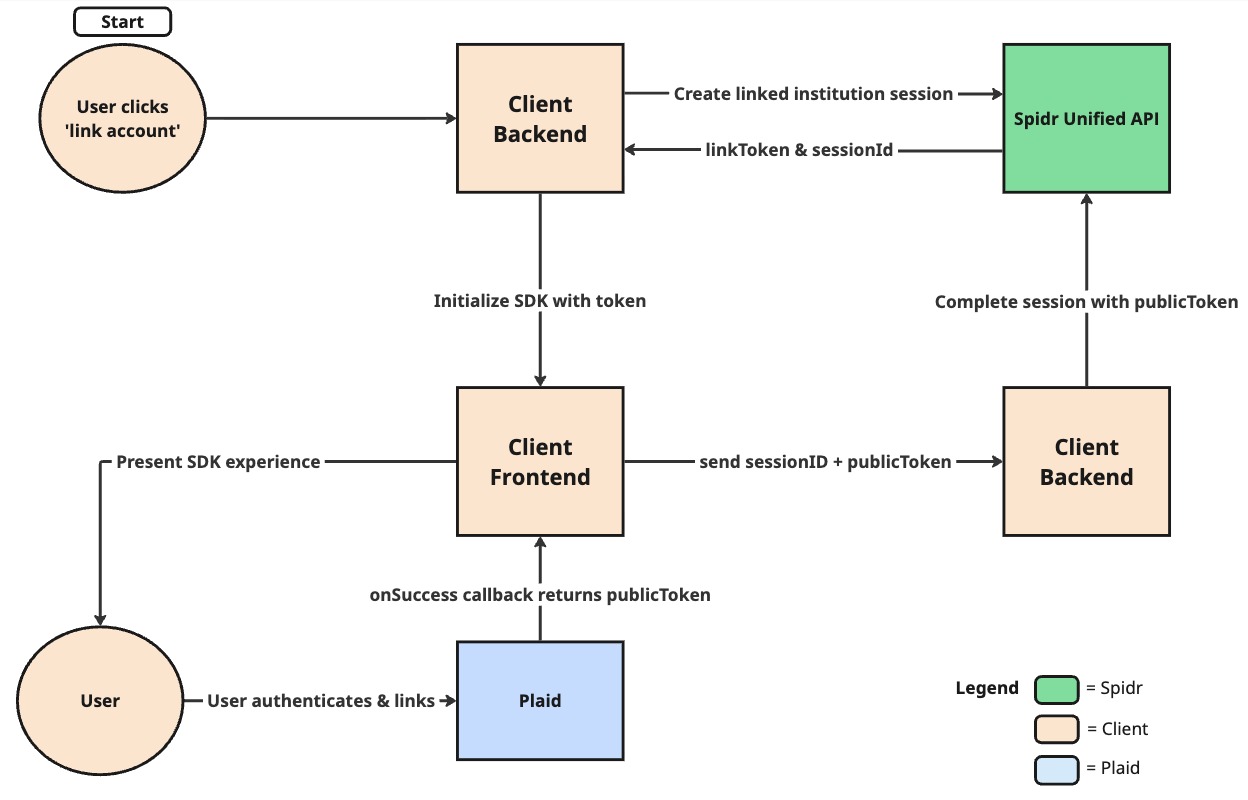
SDK Experience Flow
Use this when you embed Plaid Link directly in your frontend application.
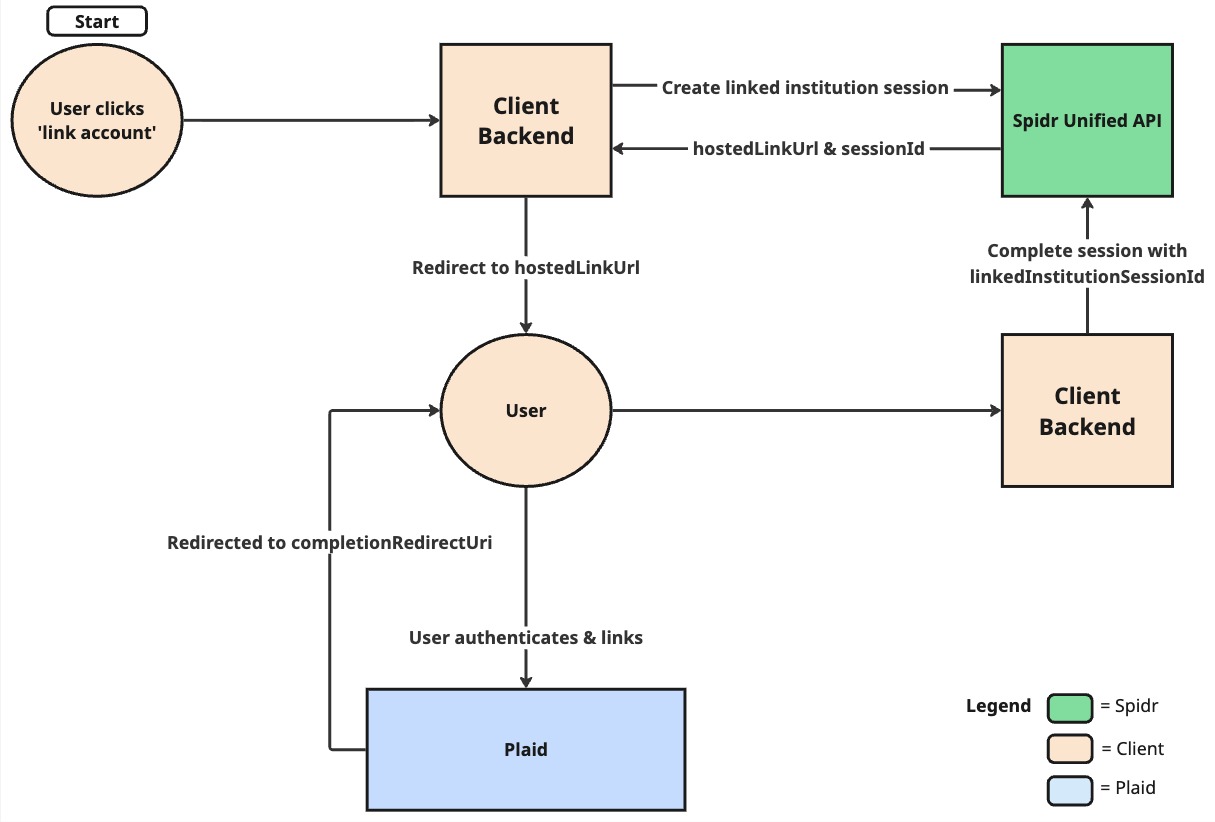
Hosted URL Experience Flow
Use this when you want Plaid to host the entire Link experience. No frontend integration or webhooks required.
Step 1: Create a Linked Institution Session
Your backend calls the Spidr ZTM API to create a session. The response includes both a linkToken (for SDK) and hostedLinkUrl (for hosted experience).
API Reference: POST /ztm/v1/linked-institution/session/create
Request
POST /ztm/v1/linked-institution/session/create
Content-Type: application/json
x-client-request-id: <unique-request-id>
apikey: <your-api-key>

{
  "userId": "669dd8fa866f2d225027b3ee",
  "productId": "67ca1fa8599e6b6e661cd9b4",
  "services": ["account_linking", "account_verification"],
  "provider": "plaid",
  "providerOptions": {
    "displayName": "My App"
  }
}
Request Fields
| Field | Type | Required | Description |
|---|---|---|---|
userId | string | Yes | The Spidr user ID |
productId | string | Yes | Your product ID (contains Plaid configuration) |
services | string[] | Yes | Services to enable (see below) |
provider | string | Yes | Provider to use: "plaid" |
providerOptions.displayName | string | Yes (Plaid) | Name shown in Plaid Link UI |
providerOptions.language | string | No | Language for Plaid Link UI (e.g. "en", "es") |
providerOptions.accountSelection | boolean | No | Allow user to select specific accounts |
providerOptions.redirectUri | string | No | OAuth redirect URI (SDK experience with OAuth banks) |
providerOptions.androidPackageName | string | No | Android package name for deep linking |
providerOptions.hostedLinkUrl.completionRedirectUri | string | No | URL to redirect user after completing the hosted flow |
providerOptions.hostedLinkUrl.deliveryMethod | string | No | How to deliver the hosted link: "email" or "sms" |
providerOptions.hostedLinkUrl.isMobileApp | boolean | No | Whether the flow is for a mobile app |
providerOptions.hostedLinkUrl.urlLifetimeSeconds | number | No | Custom lifetime for the hosted link URL (60–86400) |
linkedInstitutionId | string | No | For re-authentication of existing institutions |
Available Services
| Service | Description |
|---|---|
account_linking | Basic account linking for ACH transfers |
account_verification | Verify account ownership |
transaction_aggregation | Access transaction history (requires account_linking) |
Response
{
  "status": "success",
  "data": {
    "linkedInstitutionSessionId": "678abc123def456789012345",
    "spidrActionId": "678abc123def456789012346",
    "provider": "plaid",
    "providerData": {
      "linkToken": "link-sandbox-xxxxxxxx-xxxx-xxxx-xxxx-xxxxxxxxxxxx",
      "hostedLinkUrl": "https://secure.plaid.com/link/xxxxxxxxxx",
      "expiration": "2027-01-15T12:00:00Z"
    }
  }
}
Key Response Fields:
| Field | Use With |
|---|---|
linkedInstitutionSessionId | Both methods - needed for Complete Session |
providerData.linkToken | SDK Experience - Pass to Plaid Link SDK |
providerData.hostedLinkUrl | Hosted Experience - Redirect user here |
Step 2A: SDK Experience (Plaid Link UI)
Use this method when you want to embed Plaid Link directly in your web or mobile application.
Prerequisites
npm install react-plaid-linkReact Implementation
import { useState, useCallback, useEffect } from 'react';
import { usePlaidLink, PlaidLinkOnSuccess, PlaidLinkOnExit } from 'react-plaid-link';

function LinkAccountFlow({ userId, productId }: { userId: string; productId: string }) {
  const [linkToken, setLinkToken] = useState<string | null>(null);
  const [sessionId, setSessionId] = useState<string | null>(null);

  // Step 1: Get link token from your backend
  const initiateLinking = async () => {
    const response = await fetch('/api/linked-institution/create-session', {
      method: 'POST',
      headers: { 'Content-Type': 'application/json' },
      body: JSON.stringify({
        userId,
        productId,
        provider: 'plaid',
        services: ['account_linking'],
        providerOptions: { displayName: 'My App' }
      }),
    });

    const data = await response.json();

    // Use linkToken for SDK experience
    setLinkToken(data.data.providerData.linkToken);
    setSessionId(data.data.linkedInstitutionSessionId);
  };

  // Step 3: Complete session after Plaid success
  const handlePlaidSuccess: PlaidLinkOnSuccess = useCallback(async (publicToken, metadata) => {
    console.log('Plaid Link success:', { publicToken, metadata });

    // Send publicToken to complete the session
    await fetch('/api/linked-institution/complete-session', {
      method: 'POST',
      headers: { 'Content-Type': 'application/json' },
      body: JSON.stringify({
        linkedInstitutionSessionId: sessionId,
        providerOptions: {
          publicToken: publicToken  // Required for SDK experience
        },
      }),
    });
  }, [sessionId]);

  const handlePlaidExit: PlaidLinkOnExit = useCallback((err, metadata) => {
    if (err) {
      console.error('Plaid Link error:', err);
      if (err.error_code === 'INVALID_LINK_TOKEN') {
        // Token expired - reinitiate the flow
        setLinkToken(null);
      }
    }
  }, []);

  // Initialize Plaid Link with the linkToken
  const { open, ready } = usePlaidLink({
    token: linkToken,
    onSuccess: handlePlaidSuccess,
    onExit: handlePlaidExit,
  });

  // Auto-open when ready
  useEffect(() => {
    if (linkToken && ready) {
      open();
    }
  }, [linkToken, ready, open]);

  return (
    <button onClick={initiateLinking} disabled={!!linkToken}>
      Link Bank Account
    </button>
  );
}
Vanilla JavaScript Implementation
<script src="https://cdn.plaid.com/link/v2/stable/link-initialize.js"></script>

<script>
async function linkBankAccount() {
  // Step 1: Create session
  const response = await fetch('/api/linked-institution/create-session', {
    method: 'POST',
    headers: { 'Content-Type': 'application/json' },
    body: JSON.stringify({
      userId: 'user-123',
      productId: 'product-456',
      provider: 'plaid',
      services: ['account_linking'],
      providerOptions: { displayName: 'My App' }
    }),
  });

  const data = await response.json();
  const sessionId = data.data.linkedInstitutionSessionId;
  const linkToken = data.data.providerData.linkToken;

  // Step 2: Open Plaid Link with linkToken
  const handler = Plaid.create({
    token: linkToken,
    onSuccess: async (publicToken, metadata) => {
      // Step 3: Complete session with publicToken
      await fetch('/api/linked-institution/complete-session', {
        method: 'POST',
        headers: { 'Content-Type': 'application/json' },
        body: JSON.stringify({
          linkedInstitutionSessionId: sessionId,
          providerOptions: { publicToken },
        }),
      });
      alert('Bank account linked!');
    },
    onExit: (err, metadata) => {
      if (err) console.error('Error:', err);
    },
  });

  handler.open();
}
</script>

<button onclick="linkBankAccount()">Connect Bank Account</button>
Key Points - SDK Experience
- The
publicTokenis returned in theonSuccesscallback - you must pass it to Complete Session - The
publicTokenis short-lived (~30 minutes) - complete the session promptly - Handle
INVALID_LINK_TOKENerrors by re-creating the session
Step 2B: Hosted URL Experience
Use this method when you don't want to build frontend integration. Plaid hosts the entire Link experience.
When to Use Hosted URL
- No frontend work required - Just redirect users
- No webhooks needed - Use
completionRedirectUrito bring users back to your app - Webview-based apps - Avoids SDK compatibility issues
- Email/SMS flows - Send the link directly to users
- Embedded clients - PSPs and other integrations
- OAuth handling - Plaid manages all redirects
Implementation
// Backend: Create session with redirect URI
async function createHostedLinkSession(userId, productId) {
  // First, create a tracking ID or use your own session reference
  const internalRef = generateUniqueId();

  const response = await fetch('https://api.gospidr.com/ztm/v1/linked-institution/session/create', {
    method: 'POST',
    headers: {
      'Content-Type': 'application/json',
      'apikey': process.env.SPIDR_API_KEY,
    },
    body: JSON.stringify({
      userId,
      productId,
      provider: 'plaid',
      services: ['account_linking'],
      providerOptions: {
        displayName: 'My App',
        hostedLinkUrl: {
          // User will be redirected here after completing the flow
          completionRedirectUri: `https://yourapp.com/link-complete?ref=${internalRef}`
        }
      }
    }),
  });

  const data = await response.json();
  const sessionId = data.data.linkedInstitutionSessionId;

  // Store the mapping so you can look up the Spidr session ID later
  await storeSessionMapping(internalRef, sessionId);

  return {
    sessionId,
    hostedLinkUrl: data.data.providerData.hostedLinkUrl,
  };
}

// Redirect user to Plaid's hosted page
function redirectToHostedLink(hostedLinkUrl) {
  window.location.href = hostedLinkUrl;
}
Handling Completion (Hosted Experience)
When you include completionRedirectUri under providerOptions.hostedLinkUrl in your Create Session request, Plaid automatically redirects the user back to your app after they complete (or exit) the flow. No webhooks required.
Handle the redirect:
// Backend route: /link-complete
app.get('/link-complete', async (req, res) => {
  const { ref } = req.query;

  // Look up the Spidr session ID from your stored mapping
  const sessionId = await getSessionMapping(ref);

  // Complete the session with Spidr
  const result = await fetch('https://api.gospidr.com/ztm/v1/linked-institution/session/complete', {
    method: 'POST',
    headers: {
      'Content-Type': 'application/json',
      'apikey': process.env.SPIDR_API_KEY,
    },
    body: JSON.stringify({
      linkedInstitutionSessionId: sessionId,
    }),
  });

  const data = await result.json();

  if (data.status === 'success' && data.data.linkedInstitutions?.length > 0) {
    // Success! Show confirmation to user
    res.redirect('/dashboard?linked=success');
  } else {
    // User exited without completing, or error occurred
    res.redirect('/dashboard?linked=cancelled');
  }
});
Note: The redirect happens whether the user successfully linked OR exited early. Always call Complete Session to check the actual result.
Key Points - Hosted Experience
- Include
completionRedirectUriunderproviderOptions.hostedLinkUrlin your Create Session request - Use
hostedLinkUrlfrom the response to redirect the user - No publicToken needed when calling Complete Session - Spidr handles token exchange
- No webhooks needed - user is redirected back to your app after completion
- The redirect happens for both success AND exit - always call Complete Session to verify the result
- The hosted link URL has a default lifetime of ~30 minutes (configurable)
Step 3: Complete the Session
API Reference: POST /ztm/v1/linked-institution/session/complete
Request - SDK Experience
When using the Plaid Link SDK, you must include the publicToken:
POST /ztm/v1/linked-institution/session/complete
Content-Type: application/json
apikey: <your-api-key>

{
  "linkedInstitutionSessionId": "678abc123def456789012345",
  "providerOptions": {
    "publicToken": "public-sandbox-xxxxxxxx-xxxx-xxxx-xxxx-xxxxxxxxxxxx"
  }
}
Request - Hosted Experience
When using the hosted URL experience, only pass the session ID:
POST /ztm/v1/linked-institution/session/complete
Content-Type: application/json
apikey: <your-api-key>

{
  "linkedInstitutionSessionId": "678abc123def456789012345"
}
Response
Both methods return the same response structure:
{
  "status": "success",
  "data": {
    "linkedInstitutionSessionId": "698505f8649259b23141a5f1",
    "spidrActionId": "6985060d649259b23141a5fe",
    "linkedInstitutions": [
      {
        "id": "6985060d649259b23141a601",
        "userId": "6984f595c07bda200b0e92d6",
        "productId": "6823a83e59a0f48f78787c29",
        "provider": "plaid",
        "name": "Huntington Bank - Personal & Business",
        "status": "success",
        "vendorServices": ["account_linking", "transaction_aggregation"],
        "accounts": [
          {
            "linkedInstitutionAccountId": "6985060d649259b23141a602",
            "name": "Plaid Checking",
            "type": "depository.checking",
            "accountNumber": "************0000",
            "routingNumber": "011401533",
            "wireRoutingNumber": "021000021",
            "balance": 110,
            "availableBalance": 100,
            "currencyCode": "USD",
            "provider": "plaid",
            "providerAccountId": "rPQAVQboZpTayn1Er7QXhgQl4pxK1qTrKMQ46",
            "providerDetails": {
              "account_id": "rPQAVQboZpTayn1Er7QXhgQl4pxK1qTrKMQ46",
              "mask": "0000",
              "type": "depository",
              "subtype": "checking"
            }
          },
          {
            "linkedInstitutionAccountId": "6985060d649259b23141a603",
            "name": "Plaid Saving",
            "type": "depository.savings",
            "accountNumber": "************1111",
            "routingNumber": "011401533",
            "balance": 210,
            "availableBalance": 200,
            "currencyCode": "USD",
            "provider": "plaid",
            "providerAccountId": "zL8Rq831bkTZzwnbNX8gcn98vLq4roFAPmVrm"
          }
        ],
        "updatedAt": "2026-02-05T21:05:17.817Z"
      }
    ],
    "linkedInstitutionsErrors": []
  }
}
Key fields to save:
linkedInstitutions[].id- The linked institution ID (for refresh, remove operations)linkedInstitutions[].accounts[].linkedInstitutionAccountId- The account ID (for ACH transfers, balance checks)
Post-Linking Operations
After successfully linking an institution, you can perform these operations:
| Endpoint | Method | Description |
|---|---|---|
/ztm/v1/linked-institution/list | GET | List all linked institutions for a user |
/ztm/v1/linked-institution/{id} | DELETE | Remove a linked institution |
/ztm/v1/linked-institution/{id}/refresh | POST | Refresh institution data |
/ztm/v1/linked-institution/{id}/transactions | GET | Fetch transactions from linked institution |
/ztm/v1/linked-institution/account-balance-check | POST | Check account balance |
Example: Check Account Balance
POST /ztm/v1/linked-institution/account-balance-check
Content-Type: application/json
apikey: <your-api-key>

{
  "linkedInstitutionAccountId": "6985060d649259b23141a602",
  "userId": "6984f595c07bda200b0e92d6",
  "requestedAmount": 105.55,
  "accountMinimumBalance": 200
}| Field | Type | Required | Description |
|---|---|---|---|
linkedInstitutionAccountId | string | Yes | The linked institution account to check |
userId | string | Yes | The Spidr user ID |
requestedAmount | number | Yes | The amount to verify the account can cover |
accountMinimumBalance | number | No | Minimum balance threshold (defaults to 0) |
Error Handling
Common Errors
| Error | Cause | Solution |
|---|---|---|
INVALID_LINK_TOKEN | Link token expired (~30 min) | Create a new session |
PLAID_LINK_TOKEN_GET_NO_RESULTS_FOUND | Product not configured for Plaid | Verify product has Plaid credentials |
INVALID_CREDENTIALS | User entered wrong bank credentials | User can retry in Plaid Link |
Plaid Link Exit Statuses
When a user exits without completing, check metadata.status:
| Status | Description |
|---|---|
requires_credentials | User exited before entering credentials |
requires_code | User exited on MFA screen |
institution_not_found | User couldn't find their bank |
institution_not_supported | Selected bank not supported |
Sandbox Testing
Test Credentials
| Username | Password | Behavior |
|---|---|---|
user_good | pass_good | Success |
user_bad | pass_bad | Invalid credentials |
user_good | mfa_device | MFA device selection |
user_good | mfa_questions | Security questions |
Sandbox Test Institution
The default sandbox test institution is First Platypus Bank (ins_109508). This is Plaid's standard sandbox bank and is used by default when calling the simulate-link endpoint.
Custom Test Users (Override Account Balances)
The standard sandbox test user (user_good) returns fixed account balances (about $100 available on checking). If your test scenario needs a larger balance, for example to test a transfer or sweep that pulls more than $100 from a linked account, link with a custom sandbox test user instead.
At the institution login screen in Plaid Link:
- Select First Platypus Bank (use the standard variant, not the OAuth one; custom configurations are not reliably applied on OAuth institutions).
- Enter username user_custom.
- In the password field, paste a JSON configuration describing the accounts you want, for example:
{
  "override_accounts": [
    {
      "type": "depository",
      "subtype": "checking",
      "starting_balance": 50000,
      "force_available_balance": 50000
    }
  ]
}
Complete the flow as normal. The linked account will report the balances you configured.
Notes:
- Set force_available_balance, not just starting_balance. Balance checks use the account's available balance when present, and starting_balance only sets the current balance.
- The configuration only applies to the new link. To use it for an existing enrollment or transfer setup, link the institution again with the custom user and point your configuration at the new account.
Simulate Link (API-Only Testing)
For automated testing without the Plaid UI:
POST /ztm/v1/linked-institution/session/simulate-link
Content-Type: application/json
apikey: <your-api-key>

{
  "linkedInstitutionSessionId": "678abc123def456789012345",
  "institutionId": "ins_109508"
}
Returns a publicToken you can use with Complete Session.
Quick Reference
Integration Method Comparison
| Step | SDK Experience | Hosted Experience |
|---|---|---|
| Create Session | Same endpoint | Include providerOptions.hostedLinkUrl.completionRedirectUri |
| What to use | providerData.linkToken | providerData.hostedLinkUrl |
| User flow | In-app Plaid Link UI | Redirect to Plaid hosted page |
| Completion detection | onSuccess callback | hostedLinkUrl.completionRedirectUri (no webhooks) |
| Complete Session | Include publicToken | Session ID only |
API Endpoints
| Endpoint | Method | Description |
|---|---|---|
/ztm/v1/linked-institution/session/create | POST | Create linking session |
/ztm/v1/linked-institution/session/complete | POST | Complete linking session |
/ztm/v1/linked-institution/session/simulate-link | POST | Sandbox: simulate Plaid Link |
/ztm/v1/linked-institution/list | GET | List linked institutions |
/ztm/v1/linked-institution/{id} | DELETE | Remove linked institution |
/ztm/v1/linked-institution/{id}/refresh | POST | Refresh institution data |
/ztm/v1/linked-institution/{id}/transactions | GET | Fetch linked institution transactions |
/ztm/v1/linked-institution/account-balance-check | POST | Check account balance |
Additional Resources
Spidr Documentation:
- Create Linked Institution Session
- Complete Linked Institution Session
- Fetch Linked Institutions and Accounts
Plaid Documentation:
Updated about 1 month ago